Mastering Blockland Oneblock Skyblock: Gameplay Overview, Tips & FAQ
Welcome to Blockland Oneblock Skyblock, an exhilarating Arcade title delivering smooth, responsive web gameplay directly inside your modern browser with zero software downloads or device installations required.
Independently tested and verified on smask.my (Oct 2026). Sandboxed in modern HTML5 canvas with zero external app downloads, responsive input latency, and full cross-device compatibility.
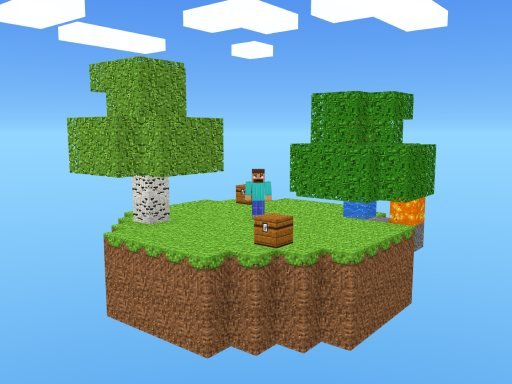
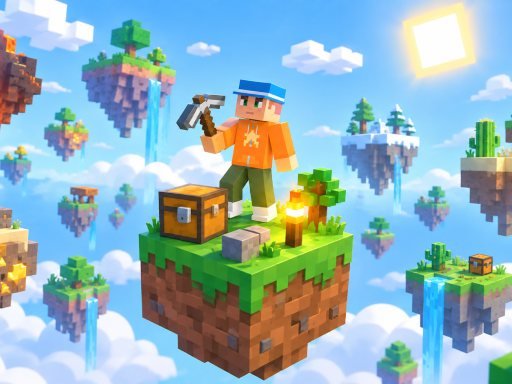
Game Overview & Concept: Are you ready for an adventure that starts with a small island and a single block in the sky? In OneBlock Skyblock, use your resources wisely to expand your island, discover new resources, and build your own world. As you break the single block, different resources and surprises will appear. Expand your island, build structures, manage your resources, and become stronger as you progress. Start with a single block, build a huge island in the sky, and try to complete all the levels!
1. Core Gameplay Mechanics, Physics & Objectives
Engineered around rigorous physics and geometric rules, Blockland Oneblock Skyblock engages your brain through satisfying spatial problem-solving. Every piece interaction adheres to consistent gravitational and collision mechanics, ensuring that outcomes are 100% fair and transparent. The tactile feedback of snapping pieces into place provides immediate sensory reinforcement for successful logic deductions.
Later levels demand advanced analytical thinking, forcing players to dismantle complex spatial bottlenecks while optimizing move economies. Whether you are clearing grid lines, routing fluid pathways, or balancing symmetry constraints, Blockland Oneblock Skyblock delivers deep cognitive engagement without artificial time gates or frustrating penalties.
2. Cross-Device Controls & Input Scheme (PC & Mobile)
Move using the WASD keys Use Shift to prevent yourself from falling Press Space to jump Use the mouse to break or place blocks Mobile touch controls are also available
- Desktop PC & Laptop: Use mouse click and directional keys (WASD or Arrow Keys) for precision maneuvering.
- Touchscreen Mobile & Tablets: Tap, swipe, or drag smoothly on the display canvas for seamless mobile play.
- Fullscreen Gaming: Click the Fullscreen icon beneath the player to expand the canvas for total immersion.
3. Top 5 Actionable Strategies for Mastering the Game
- Observe Pattern Cadences: Take the opening seconds of each round to observe moving hazards before committing your primary movements.
- Maintain Precision Over Pure Speed: Controlled, disciplined inputs yield consistent high scores far better than rushed panicked reactions.
- Master Micro-Adjustments: Use light rhythmic taps rather than holding continuous directional inputs to maintain maximum balance.
- Capitalize on Multipliers: Target glowing bonus pickups and streak multipliers whenever safe routes allow.
4. Player Progression, Reward Milestones & Longevity
The rewarding longevity of Blockland Oneblock Skyblock is anchored by a three-star rating economy and dozens of handcrafted puzzle chambers. Achieving a simple level clear is merely the first step; unlocking perfect mastery stars demands clearing the board within strict move limits and uncovering optional secret objective constraints.
With an escalating challenge curve that continually introduces fresh puzzle mechanics, Blockland Oneblock Skyblock provides dozens of hours of stimulating cognitive entertainment that exercises spatial memory and strategic deduction.
5. Helpful FAQ & Gameplay Insights
Can I play Blockland Oneblock Skyblock for free without downloading?
Yes, Blockland Oneblock Skyblock is 100% free to play directly inside your web browser on PC, tablet, and mobile devices.
Will my progress and high scores be saved?
Yes, your personal records and achievements are saved locally in your browser storage so you can return anytime.
Is Blockland Oneblock Skyblock family-friendly and safe?
Yes, this title runs within secure modern HTML5 browser sandboxes with zero downloads and is completely family-safe.
Quick Controls Guide
Move using the WASD keys Use Shift to prevent yourself from falling Press Space to jump Use the mouse to break or place blocks Mobile touch controls are also available